
The genius iPhone unlocker Geohot says today 11/3/09 is a sn0w day. All iPhones will be unlocked today because he has finally released the blackra1n RC3 with blacksn0w. It hacktivates your iPhone 3G and 3GS running 3.1.2 firmware on 05.11.07 baseband.

Here are the simple steps you can follow to unlock your iPhone firmware.
Important
Now you can do untethered Jailbreak of your iPhone 3G/3Gs running latest firmware 3.1.3 with "Spirit".
Step by Step iPhone and iPod Touch (All models) Firmware 3.1.3 Jailbreak Guide Using Spirit
Note: This only works for iPhone 3G and 3GS. for iPhone 2G, check: BootNeuter.
- Install the latest version of iTunes, Download it here
- Connect your iPhone to PC/Mac. Go to iTunes and update your iPhone OS to software version 3.1.2
- After the update, you need to jailbreak your iPhone with blackra1n RC3. Download blackra1n (download link will be live today)
- Run the blackra1n app (On Windows 7 or Vista, you need to run it on Windows XP compatibility mode) and click on the make it ra1n button.
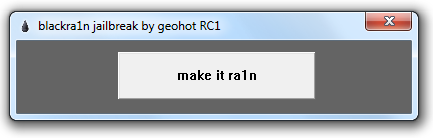
Wait until your iPhone restarts. - After the jail break, run the blackra1n app on iPhone. Tap on “sn0w” to install blacksn0w that will unlock your iPhone 3G or 3GS running 3.1.2 firmware on 05.11.07 baseband (see the screenshot below)
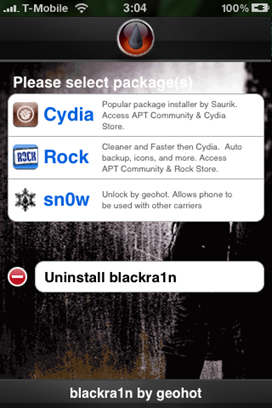
This will unlock your iPhone. Cheers!